Showing posts with label Mac. Show all posts

Friday, September 08, 2006

SnapNDrag - Screen Capture

Since I have started to even consider doing a reviews blog I have seen the need for a good screen capture tool. I have been playing with the Mac print screen key combo, but it is awkward and does not give me any control on what to capture or when by using a timed shot. I came across SnapNDrag via Google search. It looked simple, flexable and fast... just what I needed. This software delivers just what it says. I dropped the file into my Apps folder was up and running in about 30 seconds. There is a setup feature, but it's really not needed. This program just works. Just click and drag as the below image shows. There is support for multiple file formats PNG, TIFF & JPEG are included.


SnapNDrag is designed to be simple and intuitive. There are four buttons on the left side of the window. The buttons correspond to these four modes of capture:
  • Selection - lets you select an area to capture
  • Window - lets you select a window to capture
  • Screen - capture the entire screen
  • Timed - capture the entire screen after a delay
The above picture and verbage is from their website. After using this for two weeks doing hundreds of sample screen caps, I give this package 5 out of 5, honestly there is no way to improve. If they add more into it the program would slow down or become more difficult to use. Truly a great program and I highly recommend that you go to Yellowmug and get a copy for yourself!

Thursday, September 07, 2006

Cool Meditation Software for the Mac OS

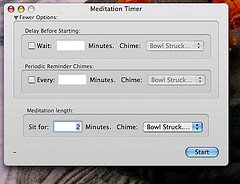
Meditation Timer


After questing around the web to find a meditation tool to help me in my sitting I discovered there aren't many out the for the Mac. I came across Meditation Timer at the Mac Update site. It looked like it would do the trick so I gave it a whirl.

I have been using the software for about a month and a half and it works great. Basically its a simple countdown timer with a few extras. The software allows you to set a delay before start, a gong or bell noise at specified intervals. You can use your own sounds in mp3 format from your personal collection or from sound repositories on the web. Here is how from the included help file....

Adding Sound Files:
You can add your own sound files easily by adding an MP3 to the resources folder. Right click meditation timer, select "Show Package Contents", and open the 'Contents/Resources' folder. Drop MP3s here and Meditation Timer will automatically detect them.

The coolest feature is that you can export your sessions to iTunes. That means you can drop the mp3 on your iPod and sit in a park or anywhere else without the need to take your Mac with you :-) I have tried this at work using my headphones during lunch. The headphones distract me but the feature is great if you have a small set of portable speakers to plug into your iPod.

This program has become a part of my daily meditation sits due to the KISS factor. I give it 4 out of 5 stars. The only thing I thing would add to improve the program is bundling mp3 importation into the program. If you meditate give this a try, I feel you will be very happy with it.